// Landing content sections. Reuses Labs components (LabCard, LabsCompanion,
// CommunityFeed) and platform data (RAOARA_PODS, LIONS, MATURITY_LEVELS).

// ---- shared section scaffolding ----
const LpSection = ({ id, alt, dark, gears, children }) => (
  <section id={id} className={`lp-section ${alt ? 'lp-section-alt' : ''} ${dark ? 'lp-section-dark' : ''} ${gears ? 'lp-has-gears' : ''}`}>
    {gears && <SectionGears />}
    <div className="lp-wrap">{children}</div>
  </section>
);

const SectionHead = ({ eyebrow, title, lead, center, light, icon }) => {
  const Ico = icon ? I[icon] : null;
  return (
    <div className={`lp-head ${center ? 'lp-center' : ''}`}>
      <div className="lp-eyebrow" style={light ? { color: '#c4b5fd' } : null}>
        {Ico && <Ico size={12} />} {eyebrow}
      </div>
      <h2 className="lp-h2" style={light ? { color: '#fff' } : null}>{title}</h2>
      {lead && <p className="lp-lead text-pretty" style={light ? { color: 'rgba(255,255,255,0.6)' } : null}>{lead}</p>}
    </div>
  );
};

// ---- sponsor strip ----
const SponsorStrip = () => {
  const seen = new Set();
  const sponsors = SPONSOR_LABS.filter(l => { if (/y[\s-]*combinator/i.test(l.sponsor)) return false; if (seen.has(l.sponsor)) return false; seen.add(l.sponsor); return true; });
  return (
    <div className="lp-sponsors">
      <div>
        <div className="lp-sponsors-label mono">Labs backed by the teams building the frontier</div>
        <div className="lp-sponsor-row">
          {sponsors.map(l => (
            <div className="lp-sponsor" key={l.sponsor}>
              <span className="lp-sponsor-mark" style={{ background: l.sponsorColor }}>{l.sponsorMark}</span>
              <span className="lp-sponsor-name">{l.sponsor}</span>
            </div>
          ))}
        </div>
      </div>
    </div>
  );
};

// ---- The RAOARA loop ----
const LoopSection = () => (
  <LpSection id="loop">
    <SectionHead
      icon="Refresh" eyebrow="THE RAOARA LOOP"
      title="Six phases. One unbroken loop."
      lead="Every ActionBoard run flows through the same six phases — then feeds what it learned straight back to the start. The loop is the product." />
    <div className="lp-loop">
      <div className="lp-loop-line" />
      <div className="lp-loop-grid">
        {RAOARA_PODS.map((pod, i) => (
          <div className="lp-loop-node" key={pod.id}>
            <div className="lp-loop-letter" style={{ background: pod.accent }}>
              {pod.letter}
              <span className="lp-loop-step mono">{String(i + 1).padStart(2, '0')}</span>
            </div>
            <div className="lp-loop-name">{pod.name}</div>
            <div className="lp-loop-sub mono">{pod.sub}</div>
            <p className="lp-loop-blurb text-pretty">{pod.blurb}</p>
          </div>
        ))}
      </div>
      <div className="lp-loop-back mono">
        <I.Refresh size={12} /> Adapt crystallises the pattern and feeds the next Recognize — the loop compounds every run.
      </div>
    </div>
  </LpSection>
);

// ---- Voltron / five Lions ----
const LION_BLURB = {
  black:  'Command. Plans the mission, decomposes the goal, and arbitrates every vote.',
  green:  'Retriever. Pulls the right context from every connected knowledge base.',
  blue:   'Builder. Drafts, codes, and assembles whatever the mission needs.',
  yellow: 'Steward. Guards every outbound action against the Charter — never bypassed.',
  red:    'Deploy & strike. Ships the action to real systems the moment it clears.',
};
const LION_ACCENT = { black: '#a855f7', green: '#059669', blue: '#0284c7', yellow: '#d97706', red: '#e11d48' };

const VoltronSection = () => (
  <LpSection id="voltron" alt>
    <SectionHead
      icon="Compass" eyebrow="VOLTRON ARCHITECTURE"
      title="One Castle. Five Lions. One formation."
      lead="Each tenant runs a Castle of five specialised Lion agents. They form up per mission — one commands, the rest execute under a policy gate that never switches off." />
    <div className="lp-lion-grid">
      {LIONS.map(lion => {
        const dark = lion.id === 'black';
        const accent = LION_ACCENT[lion.id] || lion.color;
        return (
          <article className={`lp-lion-card ${dark ? 'lp-lion-dark' : ''}`} key={lion.id}
            style={{ '--lion': accent, background: dark ? lion.color : '#fff' }}>
            <div className="lp-lion-top">
              <span className="lp-lion-dot" style={{ background: accent }}>
                <I.Lion size={16} stroke="#fff" />
              </span>
              <span className={`lp-lion-status ${lion.status === 'active' ? 'on' : ''}`}>
                <span className="dot" style={{ background: lion.status === 'active' ? '#10b981' : '#a1a1aa' }} />
                {lion.status}
              </span>
            </div>
            <div className="lp-lion-name" style={dark ? { color: '#fff' } : null}>{lion.name}</div>
            <div className="lp-lion-role mono" style={{ color: accent }}>{lion.role}</div>
            <p className="lp-lion-blurb text-pretty" style={dark ? { color: 'rgba(255,255,255,0.66)' } : null}>
              {LION_BLURB[lion.id]}
            </p>
          </article>
        );
      })}
    </div>
    <div className="lp-voltron-foot">
      <button className="lp-btn lp-btn-dark" type="button" onClick={() => window.__openWaitlist && window.__openWaitlist()}><I.Castle size={14} /> Configure your Castle</button>
      <span className="lp-foot-note">Per-Lion models, pods, KB access, hooks & rules — all in the installer.</span>
    </div>
  </LpSection>
);

// ---- The ActionBoard app (automated + collaborative actions, web + mobile) ----
const APP_FEATURES = [
  { icon: 'Zap', title: 'Fast execution, any model', body: 'A live interface that fires actions the moment you decide — run every step with any model you choose, no lock-in.' },
  { icon: 'Layers', title: 'Structured action datasets', body: 'Build structured datasets as you work, so the board learns exactly which actions still need you in the loop.' },
  { icon: 'Compass', title: 'Compounding action goals', body: 'Hit a goal once and the model adapts — rerun the same goal on your own action model instead of a frontier LLM.', stat: '−89% tokens' },
];

const AppSection = () => (
  <LpSection id="app" alt>
    <SectionHead
      center icon="Layers" eyebrow="WHY ACTIONBOARD"
      title="Take action from anywhere — automated or with your team."
      lead="Every board is a place to do the work: fire automated actions, hand off to teammates, and stay in sync across web and mobile. Three things make it compound." />
    <div className="lp-center" style={{ marginTop: -22, marginBottom: 44 }}>
      <a className="lp-btn lp-btn-primary lp-btn-lg" href="Welcome.html">Learn more <I.ArrowRight size={15} /></a>
    </div>
    <div className="lp-app-stage">
      <div className="lp-app-glow" />
      <div className="lp-browser">
        <div className="lp-browser-bar">
          <div className="lp-browser-dots">
            <span style={{ background: '#ff5f57' }} />
            <span style={{ background: '#febc2e' }} />
            <span style={{ background: '#28c840' }} />
          </div>
          <div className="lp-browser-url"><I.Lock size={11} /> app.actionboard.ai</div>
          <span style={{ width: 52, flex: 'none' }} />
        </div>
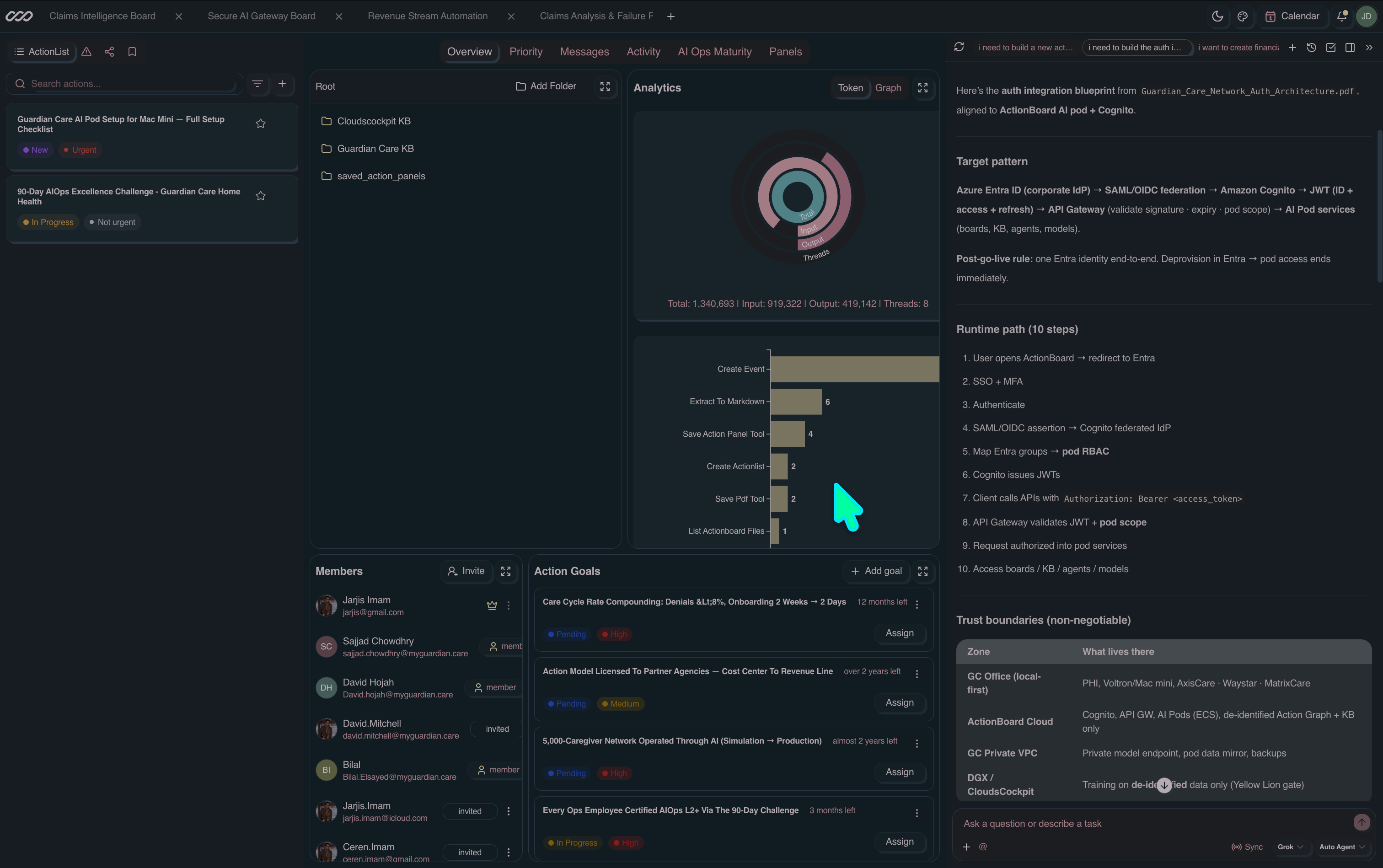
        <img className="lp-browser-shot" src="assets/app-web.png" loading="lazy"
          alt="ActionBoard.ai web app — boards, analytics, team goals, and the AI action chat" />
      </div>
      <div className="lp-phone">
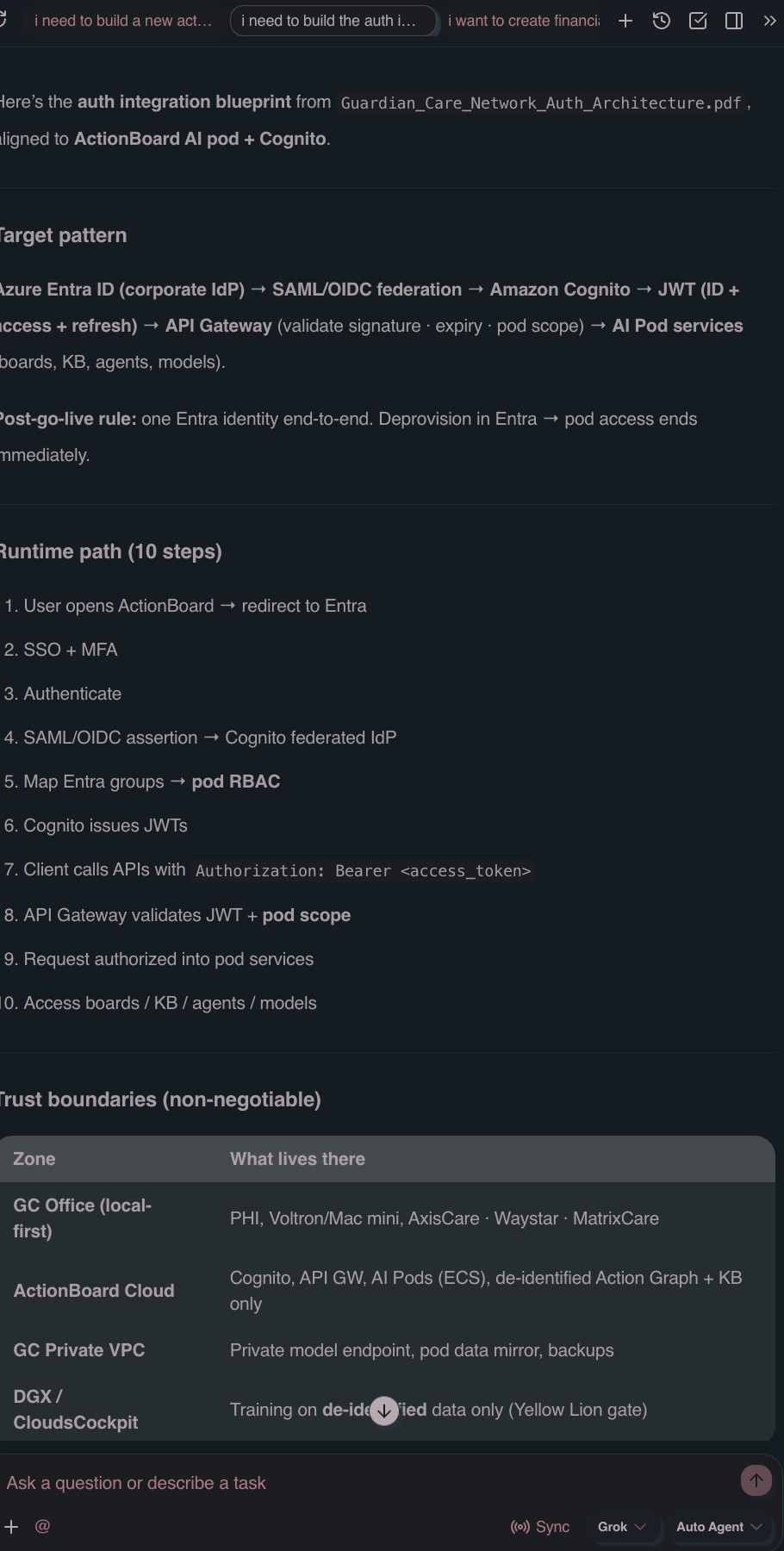
        <img className="lp-phone-shot" src="assets/app-mobile.png" loading="lazy"
          alt="ActionBoard.ai on mobile — the AI action assistant" />
      </div>
    </div>
    <div className="lp-app-features">
      {APP_FEATURES.map(f => {
        const Ico = I[f.icon] || I.Sparkle2;
        return (
          <div className="lp-app-feat" key={f.title}>
            <div className="lp-app-feat-ico"><Ico size={18} /></div>
            <h4>{f.title}</h4>
            <p className="text-pretty">{f.body}</p>
            {f.stat && (
              <div className="row" style={{ gap: 6, marginTop: 2 }}>
                <span className="badge badge-emerald" style={{ fontSize: 10.5 }}>{f.stat}</span>
              </div>
            )}
          </div>
        );
      })}
    </div>
  </LpSection>
);

// ---- Voltron desktop app (local AIOps command center) ----
const VOLTRON_FEATURES = [
  { icon: 'Home', title: 'Local-first command center', body: 'Runs on your own machine. Repos, data, and agents stay local until you decide otherwise.' },
  { icon: 'Globe', title: 'Browser Action Panels', body: 'Agents drive real web apps in embedded browser tabs — capture flows, run templates, automate anything.' },
  { icon: 'Code', title: 'Coding + action agents', body: 'Multiple coding and action agents (Voltron Code Build) work your codebase in parallel, live.' },
  { icon: 'Compass', title: 'Voltron Formation', body: 'Lions scale local ↔ cloud on demand — burst out only when it is the cost-effective call.' },
];
const VOLTRON_THUMBS = [
  { src: 'assets/voltron-code.png', cap: 'Code Build', tag: 'coding agents' },
  { src: 'assets/voltron-panel.png', cap: 'Action Panel', tag: 'browser panels' },
  { src: 'assets/voltron-allura.png', cap: 'Allura Guide', tag: 'RAOARA' },
];

const VoltronDesktopSection = () => (
  <LpSection id="desktop" dark>
    <div className="lp-vg" />
    <SectionHead
      center light icon="Castle" eyebrow="VOLTRON · DESKTOP APP"
      title="Turn your machine into an AIOps command center."
      lead="Voltron is the most advanced desktop AI app for AIOps — Browser Action Panels plus a fleet of coding and action agents running fully local or hybrid. Voltron Formation scales the Lion agents across local and cloud on demand: the most cost-effective, practical AIOps anywhere." />
    <div className="lp-center" style={{ marginTop: -18, marginBottom: 42 }}>
      <div className="lp-hero-cta" style={{ justifyContent: 'center' }}>
        <button className="lp-btn lp-btn-primary lp-btn-lg" type="button" onClick={() => window.__openWaitlist && window.__openWaitlist()}><I.Download size={15} /> Download Voltron</button>
        <a className="lp-btn lp-btn-ghost-light lp-btn-lg" href="#labs"><I.Play size={14} /> See it in action</a>
      </div>
      <div className="lp-plat">
        <span>Available for</span>
        <span className="badge"><I.Apple size={11} /> macOS</span>
        <span className="badge"><I.Windows size={11} /> Windows</span>
        <span className="badge"><I.Linux size={11} /> Linux</span>
      </div>
    </div>
    <div className="lp-macwin">
      <div className="lp-macbar">
        <div className="lp-macdots">
          <span style={{ background: '#ff5f57' }} />
          <span style={{ background: '#febc2e' }} />
          <span style={{ background: '#28c840' }} />
        </div>
        <div className="lp-mactitle">Voltron — ActionBoard Command Center</div>
        <span style={{ width: 52, flex: 'none' }} />
      </div>
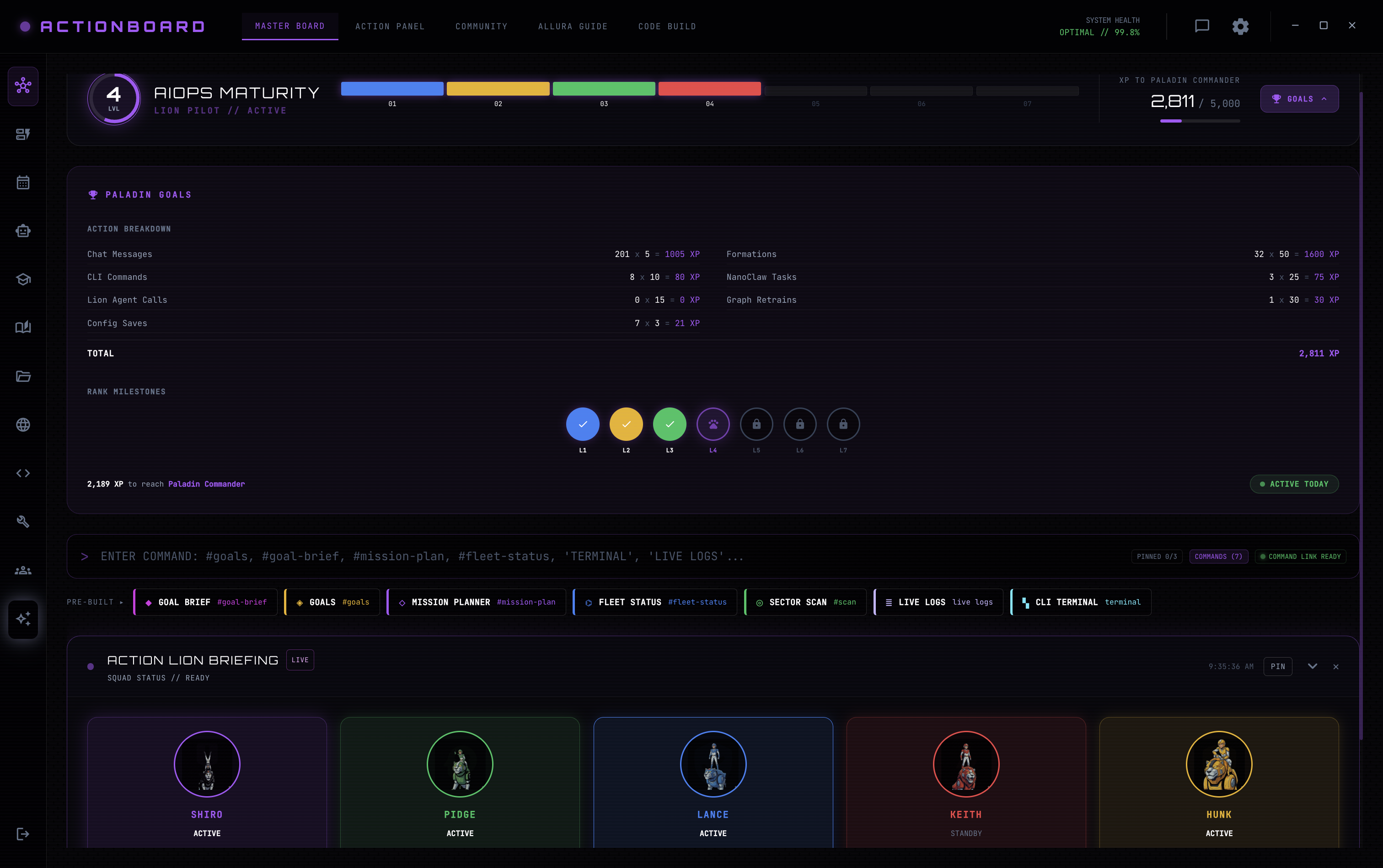
      <img className="lp-macshot" src="assets/voltron-master.png" loading="lazy"
        alt="Voltron desktop app — Master Board with AIOps maturity and the five Action Lions" />
    </div>
    <div className="lp-vfeat-grid">
      {VOLTRON_FEATURES.map(f => {
        const Ico = I[f.icon] || I.Sparkle2;
        return (
          <div className="lp-vfeat" key={f.title}>
            <div className="lp-vfeat-ico"><Ico size={18} /></div>
            <h4>{f.title}</h4>
            <p className="text-pretty">{f.body}</p>
          </div>
        );
      })}
    </div>
    <div className="lp-vthumbs">
      {VOLTRON_THUMBS.map(t => (
        <figure className="lp-vthumb" key={t.cap}>
          <img src={t.src} loading="lazy" alt={`Voltron ${t.cap}`} />
          <figcaption className="lp-vthumb-cap">{t.cap}<span className="mono">{t.tag}</span></figcaption>
        </figure>
      ))}
    </div>
  </LpSection>
);

// ---- Research-based adoption: closed-loop AIOps + model tuning ----
const RESEARCH_STAGES = [
  { step: '01', name: 'Run', icon: 'Play', accent: '#6d28d9', body: 'Run the RAOARA loop on your live stack.' },
  { step: '02', name: 'Capture', icon: 'Scan', accent: '#0284c7', body: 'Every action, accept & reject becomes labeled telemetry.' },
  { step: '03', name: 'Dataset', icon: 'Database', accent: '#059669', body: 'Labs assemble the exact tuning dataset — automatically.' },
  { step: '04', name: 'Tune', icon: 'Brain', accent: '#d97706', body: 'Fine-tune and steer your model — LoRA + CAST vectors.' },
  { step: '05', name: 'Deploy', icon: 'Zap', accent: '#e11d48', body: 'Ship the tuned model. The next cycle starts smarter.' },
];

// ---- AI Labs showcase (reuses LabCard) ----
const catLabs = (ids) => ids.map(id => SPONSOR_LABS.find(l => l.id === id)).filter(Boolean);

const TeamTunedCard = ({ b }) => (
  <article className="lp-tt-card" style={{ '--tt': b.accent }}>
    <div className="lp-tt-top">
      <span className="lp-tt-tag mono">{b.tag}</span>
      <span className="badge badge-emerald tabular" style={{ fontSize: 10.5 }}>−{b.saved}% tokens</span>
    </div>
    <h4 className="lp-tt-name">{b.name}</h4>
    <p className="lp-tt-blurb text-pretty">{b.blurb}</p>
    <div className="lp-tt-pods">
      {b.pods.map((p, i) => (
        <React.Fragment key={p}>
          {i > 0 && <I.ArrowRight size={10} className="lp-tt-arrow" />}
          <span className="lp-tt-pod mono">{p}</span>
        </React.Fragment>
      ))}
    </div>
    <div className="lp-tt-foot">
      <div className="lp-tt-models mono">
        <span className="lp-tt-base">{b.base}</span>
        <I.ArrowRight size={11} />
        <span className="lp-tt-tuned">{b.tuned}</span>
      </div>
      <div className="lp-tt-runs mono">{b.runs} runs</div>
    </div>
    <a className="lp-btn lp-btn-sm lp-btn-primary lp-tt-cta" href="Welcome.html">Clone board <I.ArrowRight size={12} /></a>
  </article>
);

const LabsSection = ({ onDeploy }) => {
  const [tab, setTab] = React.useState('category');
  const [page, setPage] = React.useState(0);
  const [catPage, setCatPage] = React.useState(0);
  const PER_PAGE = 3;
  const pageCount = Math.ceil(SPONSOR_LABS.length / PER_PAGE);
  const pageLabs = SPONSOR_LABS.slice(page * PER_PAGE, page * PER_PAGE + PER_PAGE);
  const tabs = [
    { id: 'category', label: 'Templates by category', icon: 'Layers' },
    { id: 'all', label: 'All AI Labs', icon: 'Lab' },
    { id: 'team', label: 'Team-tuned boards', icon: 'Sparkles' },
  ];
  return (
    <LpSection id="labs" gears>
      <SectionHead
        icon="Lab" eyebrow="AI LABS"
        title="Build your AI Labs with pre-configured KnowledgeBase and Action Agents."
        lead="Community-sponsored AI Labs are built on shared infra with private data buckets — the fastest way to test which AI operation environment best suits your use case." />

      <div className="lp-ltabs" role="tablist">
        {tabs.map(t => {
          const Ico = I[t.icon] || I.Lab;
          return (
            <button key={t.id} role="tab" aria-selected={tab === t.id}
              className={`lp-ltab ${tab === t.id ? 'on' : ''}`} onClick={() => { setTab(t.id); setPage(0); setCatPage(0); }}>
              <Ico size={14} /> {t.label}
            </button>
          );
        })}
      </div>

      {tab === 'category' && (
        <div className="lp-cat-wrap">
          {[LAB_CATEGORIES[catPage]].map(cat => {
            const Ico = I[cat.icon] || I.Layers;
            return (
              <div className="lp-cat" key={cat.id}>
                <div className="lp-cat-head">
                  <span className="lp-cat-ico"><Ico size={16} /></span>
                  <div className="lp-cat-meta">
                    <h3 className="lp-cat-title">{cat.label}</h3>
                    <p className="lp-cat-sub">{cat.blurb}</p>
                  </div>
                  <span className="lp-cat-count mono">{cat.ids.length} labs</span>
                </div>
                <div className="lp-soon-wrap">
                  <div className="lp-labs-grid" aria-hidden="true">
                    {catLabs(cat.ids).slice(0, 3).map(lab => (
                      <LabCard key={cat.id + '-' + lab.id} lab={lab} onDeploy={onDeploy} onMore={onDeploy} />
                    ))}
                  </div>
                  <div className="lp-soon-overlay" role="button" tabIndex={0} onClick={() => window.__openWaitlist && window.__openWaitlist()}>
                    <div className="lp-soon-card">
                      <span className="lp-soon-badge"><I.Sparkles size={12} /> Coming soon</span>
                      <div className="lp-soon-title">New category labs are coming soon</div>
                      <div className="lp-soon-sub">Join the waitlist for early access to the full AI Labs library.</div>
                      <button className="lp-btn lp-btn-primary lp-btn-sm" type="button" onClick={(e) => { e.stopPropagation(); window.__openWaitlist && window.__openWaitlist(); }}>Join the waitlist</button>
                    </div>
                  </div>
                </div>
              </div>
            );
          })}
          <div className="lp-pager">
            <button className="lp-pager-btn" disabled={catPage === 0} onClick={() => setCatPage(p => Math.max(0, p - 1))} aria-label="Previous category">
              <I.ArrowRight size={15} style={{ transform: 'rotate(180deg)' }} />
            </button>
            <div className="lp-pager-dots">
              {LAB_CATEGORIES.map((c, i) => (
                <button key={c.id} className={`lp-pager-dot ${i === catPage ? 'on' : ''}`} onClick={() => setCatPage(i)}>{c.label}</button>
              ))}
            </div>
            <button className="lp-pager-btn" disabled={catPage >= LAB_CATEGORIES.length - 1} onClick={() => setCatPage(p => Math.min(LAB_CATEGORIES.length - 1, p + 1))} aria-label="Next category">
              <I.ArrowRight size={15} />
            </button>
          </div>
        </div>
      )}

      {tab === 'all' && (
        <React.Fragment>
          <div className="lp-labs-grid">
            {pageLabs.map(lab => (
              <LabCard key={lab.id} lab={lab} onDeploy={onDeploy} onMore={onDeploy} />
            ))}
          </div>
          <div className="lp-pager">
            <button className="lp-pager-btn" disabled={page === 0} onClick={() => setPage(p => Math.max(0, p - 1))} aria-label="Previous labs">
              <I.ArrowRight size={15} style={{ transform: 'rotate(180deg)' }} />
            </button>
            <div className="lp-pager-dots">
              {Array.from({ length: pageCount }).map((_, i) => (
                <button key={i} className={`lp-pager-dot ${i === page ? 'on' : ''}`} onClick={() => setPage(i)} aria-label={`Page ${i + 1}`}>{i + 1}</button>
              ))}
            </div>
            <button className="lp-pager-btn" disabled={page >= pageCount - 1} onClick={() => setPage(p => Math.min(pageCount - 1, p + 1))} aria-label="Next labs">
              <I.ArrowRight size={15} />
            </button>
          </div>
        </React.Fragment>
      )}

      {tab === 'team' && (
        <React.Fragment>
          <div className="lp-tt-note">
            <span className="lp-tt-note-ico"><I.Sparkles size={14} /></span>
            <span>Boards the ActionBoard team distilled onto a tuned action-model — clone one and it runs your goal at a fraction of the tokens.</span>
          </div>
          <div className="lp-tt-grid">
            {TEAM_TUNED_BOARDS.map(b => <TeamTunedCard key={b.id} b={b} />)}
          </div>
        </React.Fragment>
      )}

      <SponsorStrip />
      <div className="lp-labs-foot">
        <button className="lp-btn lp-btn-primary" type="button" onClick={() => window.__openWaitlist && window.__openWaitlist()}>Join the waitlist to see the full list of new labs <I.ArrowRight size={13} /></button>
      </div>
    </LpSection>
  );
};

// ---- AIOps maturity ladder ----
const MaturitySection = () => (
  <LpSection id="maturity" alt gears>
    <SectionHead
      icon="Trophy" eyebrow="AIOPS MATURITY"
      title="Climb seven levels of autonomy."
      lead="From a manual apprentice to a fully autonomous Chief AutoAction Officer — you climb by completing RAOARA loops, not by buying licences. Each rung turns on new automation and retires a class of manual work." />
    <div className="lp-mat">
      <div className="lp-mat-track">
        {MATURITY_LEVELS.map((lvl, i) => {
          const h = 62 + ((lvl.id - 1) / 6) * 132;
          return (
            <div className="lp-mat-col" key={lvl.id}>
              <div className="lp-mat-auto mono">{lvl.auto}%</div>
              <div className="lp-mat-bar" style={{ height: h, background: lvl.color, animationDelay: `${i * 70}ms` }} />
              <div className="lp-mat-short mono" style={{ color: lvl.color }}>{lvl.short}</div>
              <div className="lp-mat-name">{lvl.name}</div>
              <div className="lp-mat-desc">{lvl.desc}</div>
            </div>
          );
        })}
      </div>
      <div className="lp-mat-axis mono">
        <span>manual · high-risk · high-cost</span>
        <span className="lp-mat-arrow"><I.ArrowRight size={12} /> autonomous · self-governing</span>
      </div>
    </div>
  </LpSection>
);

// ---- Proof / receipts (from the parent-company Method — real operator results) ----
const PROOF_STATS = [
  { num: '89', unit: '%', tag: 'Token cost', cap: 'Cut climbing L1 → L7 — a mature operator runs on a fraction of baseline LLM spend.' },
  { num: '80', unit: '%+', tag: 'Throughput', cap: 'More actions executed per operator once the full RAOARA loop is running.' },
  { num: '100', unit: '%', tag: 'POC → demand', cap: 'Of proof-of-concept users asked for the full version afterwards.' },
  { num: '7', unit: '', tag: 'Research partners', cap: 'University AI labs partnered this past year — AIUB and six others.' },
];
const PROOF_CASES = ['NGO Ops', 'Garments', 'Legal', 'HR', 'Micro-Task', 'DevOps', 'CloudOps', 'UX'];

// Design principles — after Werner Vogels' The Frugal Architect (thefrugalarchitect.com).
// Every ActionBoard is built to make cost a first-class, compounding constraint.
const FRUGAL_LAWS = [
  { n: 'I',   title: 'Cost is a non-functional requirement', body: 'Treat spend like security or availability — designed in upfront, never bolted on after launch.' },
  { n: 'II',  title: 'Systems that last align cost to business', body: 'Tie every board\'s cost to the dimension that actually earns — architecture follows the revenue driver.' },
  { n: 'III', title: 'Architecting is a series of trade-offs', body: 'Balance cost, resilience and performance on purpose. Frugality maximizes value, it doesn\'t just cut spend.' },
  { n: 'IV',  title: 'Unobserved systems lead to unknown costs', body: 'A visible meter changes behavior. Every loop is instrumented so waste can\'t hide.' },
  { n: 'V',   title: 'Cost-aware architectures implement controls', body: 'Granular controls plus live monitoring — act exactly where an improvement is needed.' },
  { n: 'VI',  title: 'Cost optimization is incremental', body: 'Efficiency is continuous. Boards revisit their own patterns each loop and shave the next run.' },
  { n: 'VII', title: 'Unchallenged success leads to assumptions', body: '"We\'ve always done it this way" is the expensive path. Adapt re-questions what worked before.' },
];

const ProofSection = () => {
  const [tab, setTab] = React.useState('principles');
  return (
    <LpSection id="proof" gears>
      <SectionHead
        icon="Trophy" eyebrow="THE RECEIPTS"
        title="What the method has shipped."
        lead="Three years of operator experiments across NGO, factory, legal, HR, DevOps and CloudOps work — every board built on the same RAOARA pattern, every completed loop compounding the next." />

      <div className="lp-ltabs" role="tablist">
        <button role="tab" aria-selected={tab === 'principles'} className={`lp-ltab ${tab === 'principles' ? 'on' : ''}`} onClick={() => setTab('principles')}>
          <I.Compass2 size={14} /> Design principles
        </button>
        <button role="tab" aria-selected={tab === 'team'} className={`lp-ltab ${tab === 'team' ? 'on' : ''}`} onClick={() => setTab('team')}>
          <I.User size={14} /> Build team mindset
        </button>
        <button role="tab" aria-selected={tab === 'receipts'} className={`lp-ltab ${tab === 'receipts' ? 'on' : ''}`} onClick={() => setTab('receipts')}>
          <I.Trophy size={14} /> The receipts
        </button>
      </div>

      {tab === 'receipts' && (
        <React.Fragment>
          <div className="lp-proof-grid">
            {PROOF_STATS.map(s => (
              <div className="lp-proof-stat" key={s.tag}>
                <div className="lp-proof-num tabular">{s.num}<span className="lp-proof-unit">{s.unit}</span></div>
                <div className="lp-proof-tag mono">{s.tag}</div>
                <p className="lp-proof-cap text-pretty">{s.cap}</p>
              </div>
            ))}
          </div>
          <div className="lp-proof-foot">
            <div className="lp-proof-cases">
              {PROOF_CASES.map(c => <span className="lp-proof-case" key={c}>{c}</span>)}
            </div>
            <div className="lp-proof-free"><I.Sparkle2 size={13} /> Community-first: <strong>$0</strong> to experiment for communities facing job loss and AI risk.</div>
          </div>
        </React.Fragment>
      )}

      {tab === 'principles' && (
        <React.Fragment>
          <div className="lp-law-intro">
            <span>Every board is engineered to make cost compound in your favor — the seven laws of</span>
            <a href="https://www.thefrugalarchitect.com/" target="_blank" rel="noopener">The Frugal Architect <I.ArrowUpRight size={12} /></a>
          </div>
          <div className="lp-law-grid">
            {FRUGAL_LAWS.map(l => (
              <div className="lp-law" key={l.n}>
                <span className="lp-law-n mono">{l.n}</span>
                <div className="lp-law-body">
                  <h4 className="lp-law-title">{l.title}</h4>
                  <p className="text-pretty">{l.body}</p>
                </div>
              </div>
            ))}
          </div>
        </React.Fragment>
      )}

      {tab === 'team' && (
        <div className="lp-team">
          <div className="lp-team-copy">
            <p className="lp-team-lead text-pretty">
              ActionBoard.ai was designed by <strong>ex-AWS, EMC, Capital One and SecurityOps engineers</strong> — over 15 years of distributed-compute design and engineering experience.
            </p>
            <p className="lp-team-body text-pretty">
              Over four years of continuous improvement working directly with customers, we reduced the cost of AI experimentation to give every user a full end-to-end AIOps system to build their own custom model — without losing their minds.
            </p>
            <div className="lp-team-pedigree">
              {['ex-AWS', 'EMC', 'Capital One', 'SecurityOps'].map(p => (
                <span className="lp-team-chip" key={p}><I.Check size={12} stroke="var(--violet)" strokeWidth={3} /> {p}</span>
              ))}
            </div>
            <a className="lp-btn lp-btn-ghost lp-team-cta" href="https://cloudscockpit.io/about" target="_blank" rel="noopener">
              Meet the team at CloudsCockpit <I.ArrowUpRight size={13} />
            </a>
          </div>
          <div className="lp-team-pillars">
            {[
              { icon: 'Server', t: 'Built at scale', d: 'Cloud architecture from teams who ran production at AWS and Capital One.' },
              { icon: 'Zap', t: 'Cheap to experiment', d: 'Cost engineered down so trying an idea never means burning a budget.' },
              { icon: 'Brain', t: 'Own your model', d: 'A full end-to-end AIOps loop to tune a custom model that’s yours to keep.' },
            ].map(x => {
              const Ico = I[x.icon] || I.Sparkle2;
              return (
                <div className="lp-team-pillar" key={x.t}>
                  <span className="lp-team-ico"><Ico size={16} /></span>
                  <div>
                    <h4>{x.t}</h4>
                    <p className="text-pretty">{x.d}</p>
                  </div>
                </div>
              );
            })}
          </div>
        </div>
      )}
    </LpSection>
  );
};

// ---- Guided start (reuses LabsCompanion live chat) ----
const CompanionSection = ({ companionQuery, setCompanionQuery, onDeploy }) => (
  <LpSection id="ask" gears>
    <div className="lp-split">
      <div className="lp-split-copy">
        <SectionHead
          icon="MessageCircle" eyebrow="GUIDED START"
          title="Not sure where to begin? Ask."
          lead="The Labs guide reads all eight labs and your goal, then points you to the right stack — model family, token grant, and data-sharing posture included." />
        <ul className="lp-ask-list">
          {[
            'Recommends a lab from a one-line goal',
            'Explains what changes if you decline data-sharing',
            'Compares token grants across sponsors',
          ].map(t => (
            <li key={t}><I.Check size={13} stroke="var(--violet)" strokeWidth={3} /> {t}</li>
          ))}
        </ul>
      </div>
      <div className="lp-split-chat">
        <LabsCompanion
          labs={SPONSOR_LABS}
          onDeploy={onDeploy}
          currentMessage={companionQuery}
          setCurrentMessage={setCompanionQuery} />
      </div>
    </div>
  </LpSection>
);

// ---- Ecosystem (reuses CommunityFeed) ----
const CommunitySection = ({ onAskAbout, onDeployFromPost }) => (
  <LpSection id="community" alt>
    <SectionHead
      center icon="Globe" eyebrow="ECOSYSTEM"
      title="The loop never stops turning."
      lead="Fresh research, sponsor drops, and community threads — each tied to the labs it moves." />
    <CommunityFeed posts={COMMUNITY_POSTS} onAskAbout={onAskAbout} onDeployFromPost={onDeployFromPost} />
  </LpSection>
);

Object.assign(window, {
  LpSection, SectionHead, SponsorStrip, AppSection, LoopSection, VoltronSection, VoltronDesktopSection, LabsSection,
  MaturitySection, ProofSection, CompanionSection, CommunitySection,
});